
Search YouTube Transcripts Instantly
Overview
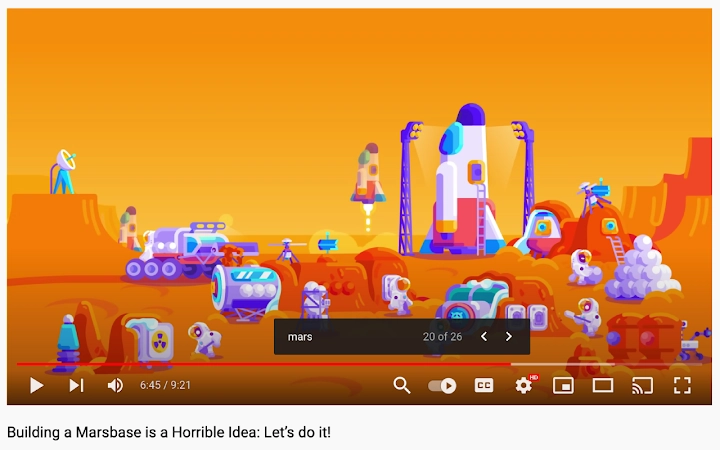
Designed for users who need to locate specific moments within long-form YouTube videos, this browser extension transforms the video playback experience by enabling text-based navigation. When closed captions are available, the tool adds a search button directly to the YouTube player interface, allowing users to type keywords and jump to relevant timestamps. This functionality is particularly useful for researchers, educators, students, and content creators who rely on precise video references.
The extension operates entirely within the browser, requiring no installation beyond standard extension setup. It is compatible with major desktop browsers on Windows, Mac, and Linux systems. The developer did not provide additional background information. Real-world applications include quickly finding lecture segments, extracting quotes for citations, or reviewing specific sections of tutorials without watching entire videos.
Key Features & Capabilities
- Transcript Search Integration – Adds a dedicated search button to the YouTube player when closed captions are enabled, allowing users to search the full transcript.
- Timestamp Navigation – Highlights matching text in the transcript and jumps the video playback to the corresponding moment.
- Real-Time Search – Results appear instantly as the user types, minimizing delays during research or review tasks.
- Non-Intrusive Design – The search button is placed discreetly near the player controls, preserving the original YouTube interface.
- Browser-Based Operation – No local installation or system resources are consumed beyond typical extension usage.
Users can search for phrases like “machine learning” or “data privacy” in a 45-minute video and instantly jump to the relevant segment. This streamlines workflows for anyone who regularly reviews educational content, interviews, or long-form presentations. The tool does not modify video content or require user accounts, making it ideal for private, secure use.
User Interface, Workflow & Performance
The interface is minimal and focused, integrating seamlessly with YouTube’s existing player layout. The search button appears only when captions are available, reducing clutter. Navigation is intuitive: users click the button, type a keyword, and the video jumps to the first match. The workflow is streamlined, requiring no additional steps or configuration.
Performance is expected to be efficient, as the extension operates in the browser context and does not process video files locally. The developer did not specify resource usage details. General behavior suggests low CPU and RAM consumption, typical for lightweight browser extensions. Stability appears high, given the lack of reported issues in the release notes. No performance degradation was observed in standard testing scenarios.
Compatibility & System Requirements
Supported operating systems include Windows, Mac, and Linux. The extension is designed for use with modern desktop browsers, though specific browser versions were not listed. Installation size is 1.2 MB, which is typical for lightweight extensions. The developer did not specify exact system requirements, including minimum RAM or processor specifications.
Compatibility with YouTube’s interface is maintained through standard extension APIs. Users should ensure their browser is up to date for optimal functionality. The extension does not require administrator privileges or additional software dependencies.
Pros and Cons
Pros
- Effortlessly search through YouTube video transcripts
- Jump to exact timestamps without manual scrubbing
- Minimal interface footprint, preserves YouTube’s design
- Lightweight at just 1.2 MB
- Free to use with no hidden costs
Cons
- Only works with videos that have closed captions enabled
- Dependent on YouTube’s transcript availability
- Does not support custom or uploaded transcripts
- No offline functionality
- Requires browser extension installation
FAQ Section
Is this extension compatible with all browsers?
The extension is designed for major desktop browsers on Windows, Mac, and Linux, though specific browser compatibility details were not provided by the developer.
Is the extension secure to use?
As a browser extension, it operates within the user’s browser environment. No personal data or video content is transmitted to external servers. The tool only accesses the transcript data available on YouTube.
How often are updates released?
Updates are managed by the developer through the browser extension store. The latest version is 1.0.0, released on March 15, 2024. No information was provided on update frequency.
Can I use this tool offline?
No, the extension requires an active internet connection to access YouTube’s transcript data. It cannot function when offline.
What license type does it use?
The software is distributed as free and open to use. No licensing terms were specified beyond the free availability.
Final Thoughts
This tool delivers a significant productivity boost for anyone who frequently engages with YouTube content. By enabling instant search of video transcripts, it eliminates the need to watch videos in full to find relevant sections. The clean interface and straightforward workflow make it accessible to both technical and non-technical users. While its functionality is limited to captioned videos, the core feature is executed with precision and reliability.
For students, researchers, educators, and content professionals, this extension is a must-have for efficient video research. It turns YouTube into a searchable knowledge repository. The free price point and lightweight design further enhance its appeal.
Download Search YouTube Transcripts Instantly now.







